
SaaS pricing calculator: tiers, margin, MRR
This free SaaS pricing calculator turns your cost per customer, target margin and competitor prices into up to four tiers. It shows each tier's price floor and margin, then your MRR, ARR, break-even point and customer lifetime value.
Median $49 from 3 prices: the anchor for your second tier.
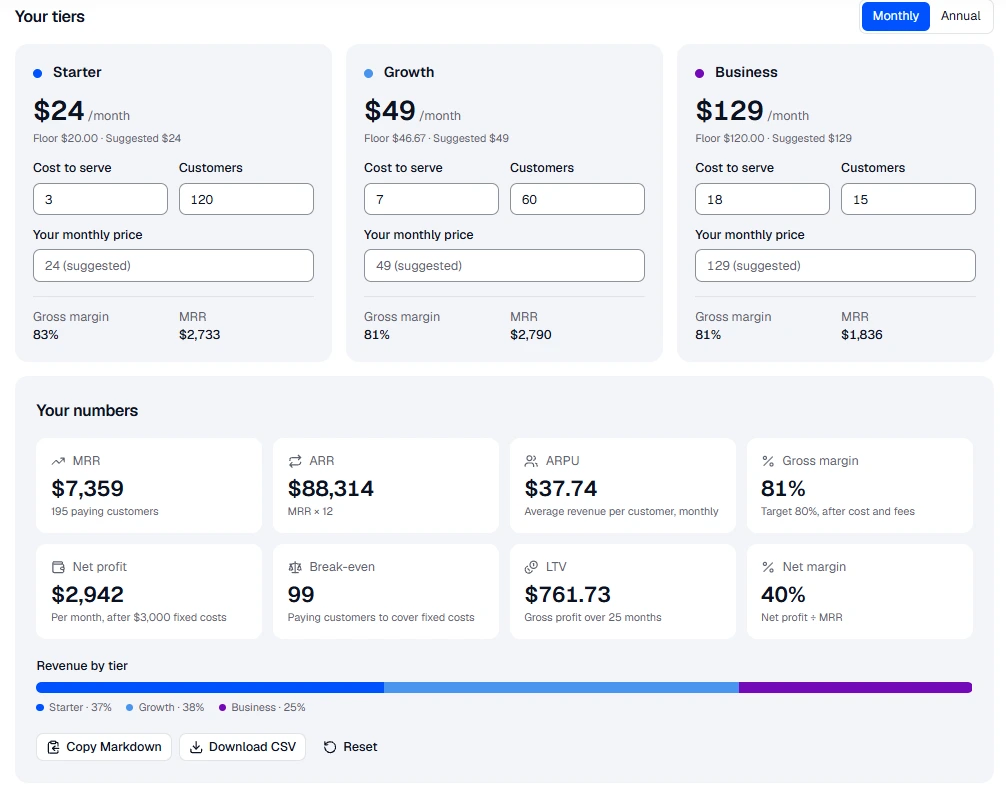
Your tiers
$24 /month
Floor $20.00 · Suggested $24
- Gross margin
- 83%
- MRR
- $2,733
$49 /month
Floor $46.67 · Suggested $49
- Gross margin
- 81%
- MRR
- $2,790
$129 /month
Floor $120.00 · Suggested $129
- Gross margin
- 81%
- MRR
- $1,836
Your numbers
MRR
$7,359
195 paying customers
ARR
$88,314
MRR × 12
ARPU
$37.74
Average revenue per customer, monthly
Gross margin
81%
Target 80%, after cost and fees
Net profit
$2,942
Per month, after $3,000 fixed costs
Break-even
99
Paying customers to cover fixed costs
LTV
$761.73
Gross profit over 25 months
Net margin
40%
Net profit ÷ MRR
Revenue by tier
- Starter · 37%
- Growth · 38%
- Business · 25%
How to use the SaaS pricing calculator
Everything runs in your browser and saves as you type, so you can close the tab and come back to the same plan. Nothing you enter is sent to us.
- Pick a currency and how many tiers you want to sell, from one plan to four.
- Set your target gross margin, payment fees, fixed monthly costs and churn. The defaults are typical for a young B2B SaaS; change any that you know better.
- Paste the monthly prices of three to five comparable competitor plans. The calculator takes their median as the price of your middle tier.
- For each tier, enter what one customer costs you per month to serve and how many customers you expect on it. The suggested price fills in; type your own to override it.
- Read the summary: a red warning means a tier is priced below its cost floor. Copy the plan as Markdown or download it as a CSV for your spreadsheet.
The formulas behind the numbers
The calculator uses the same handful of formulas a finance spreadsheet would. Knowing them helps you see which input moves the result most.
A worked example: a tier that costs $3 a month to serve, with an 80% target margin and 5% payment fees, has a floor of 3 ÷ 0.15 = $20. With 100 customers at $50, $10 cost each and $1,000 of fixed costs, each customer contributes $40, so you break even at 25 customers. At 5% monthly churn the average customer stays 20 months and is worth $800 in gross profit.
- Cost floor = cost to serve ÷ (1 − target margin − payment fees). Below it, every sale earns less than the margin you set.
- Suggested price = the competitor median for the middle tier, stepping 2.5× up or down for the others, never below the floor, rounded up to a familiar price point such as $29 or $49.
- MRR = customers × price, with the annual share billed at the annual discount. ARR = MRR × 12.
- Break-even customers = fixed monthly costs ÷ average gross profit per customer.
- Customer lifetime = 1 ÷ monthly churn. LTV = average gross profit per customer × lifetime.
How to set SaaS pricing tiers that sell
Your costs only tell you the lowest price you can survive at. What a customer will pay is set by the value they get and the alternatives they can see, which is why the calculator anchors on competitor prices and treats cost as a floor, not a target.
- Make the middle tier the obvious choice. Most buyers pick the middle of three, so give it the features most teams need and price the others around it.
- Leave a big gap between tiers. A step of two to three times keeps each upgrade a clear decision instead of a coin toss over a few dollars.
- Offer annual billing at a discount of about two months free (15–20%). It brings cash forward and cuts churn, but check the annual price still clears the floor.
- Price per seat when value grows with each person who uses the product, such as collaboration tools. Price per usage or by tier when one person gets all the value.
- Revisit prices every six months. Early SaaS founders almost always start too low, and existing customers can keep their old price while new ones pay the new one.