
OG image checker: preview every share card
This free OG image checker reads any page and shows the card it makes on Facebook, X, LinkedIn, WhatsApp, Discord and Slack. It checks the image size and every Open Graph and Twitter tag, says what to fix, and lets you download the image.
Share card preview
Enter a page's URL to see its card on Facebook, X, LinkedIn, WhatsApp, Discord and Slack, with every meta tag checked.
How to use the OG image checker
The checker fetches the page the way a platform's crawler does: no JavaScript, just the HTML the server sends. If a tag only appears after your app loads in the browser, the platforms can't see it, and neither can the checker.
- Paste the address of the page you want to share. A bare domain works too; the checker adds https:// and follows up to three redirects.
- Press Check. The card for each platform appears, built from the page's og:, twitter: and plain HTML tags with the same fallbacks each platform uses.
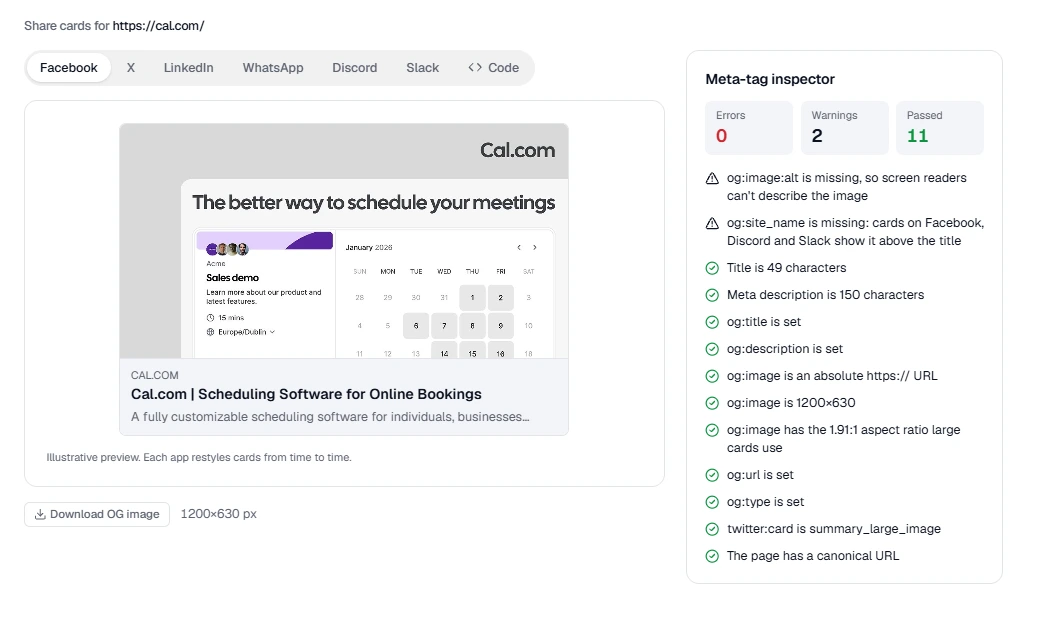
- Switch between Facebook, X, LinkedIn, WhatsApp, Discord and Slack to see how much of the title and description each one keeps and how it crops the image.
- Read the meta-tag inspector below the preview: errors break the card, warnings make it worse, and passes are tags already doing their job.
- Open the code tab to copy a full set of tags filled with what the page already has, or download the OG image to edit it.
What makes a good OG image
The og:image is most of a share card: it takes up more of the feed than the title and description together. Platforms crop and shrink it differently, so design for the strictest one.
- Size it 1200 by 630 pixels. That 1.91:1 ratio is what Facebook, LinkedIn and X's large card use, and it's big enough to stay sharp on high-density screens.
- Keep the important parts in the middle. WhatsApp and X's small card crop to a square, and some apps round the corners.
- Use a few large words, not a paragraph. A card is seen at thumbnail size in a fast-scrolling feed; text under about 40 pixels tall is unreadable there.
- Keep the file under 5 MB, as a PNG or JPEG for the widest support. WebP works on most platforms now, but some older crawlers still skip it.
- Give each page its own image. One logo on every link makes your shares look the same, and people scroll past what they think they've seen.
Why a share card shows the wrong image
Most broken cards come from a handful of causes. Work through them in order, then check the page again.
Platforms cache what they read, often for days. After fixing your tags, ask each one to read the page again: Facebook's Sharing Debugger and LinkedIn's Post Inspector both have a scrape button, and a new query string such as ?v=2 makes most other apps treat the link as new.
- The tags are added by JavaScript. Crawlers read the HTML your server returns, so render meta tags on the server or at build time.
- The image URL is relative or http://. Use a full https:// address; several platforms ignore anything else.
- The image is private or blocked. A login wall, a hotlink rule or a robots.txt disallow on the image folder stops the crawler from fetching it.
- There is no twitter:card tag. Without twitter:card set to summary_large_image, X shows a small square thumbnail instead of the full image.
- The page sets several og:image tags. Most platforms take the first one, which isn't always the one you meant.